Numpy in Python
NUMPY
zeros.shape
Numpy stand for Numerical Python. Numpy python ka ek package hai jo ki hame multidimension array object banane me madad krta hai , aur numpy ke function ki madad se hm in multi dimension array(ndarry) ke saath kaam kr skte hai. Numpy ka use scientific computing mai hota hai, scientific computing ko assaan shabdo mai kahe to ye ek tool hai jiski madad se hm computer mathematical model ko solve kr skte hai.
Data Science ke respect mai numpy ki baat kre to iska use machine learning mai hota hai, kyoki machine learning mai ham input dene ke liye numpy array ka use krte hai.
Array vs List
- Array mai hm sirf same datatype ki value store kara skte hai, lekin List mai hm different data type ki value store kara skte hai
- Numpy array mai hm mathematical operation kr skte hai lekin list mai hm mathematical operation nhi kr skte hai
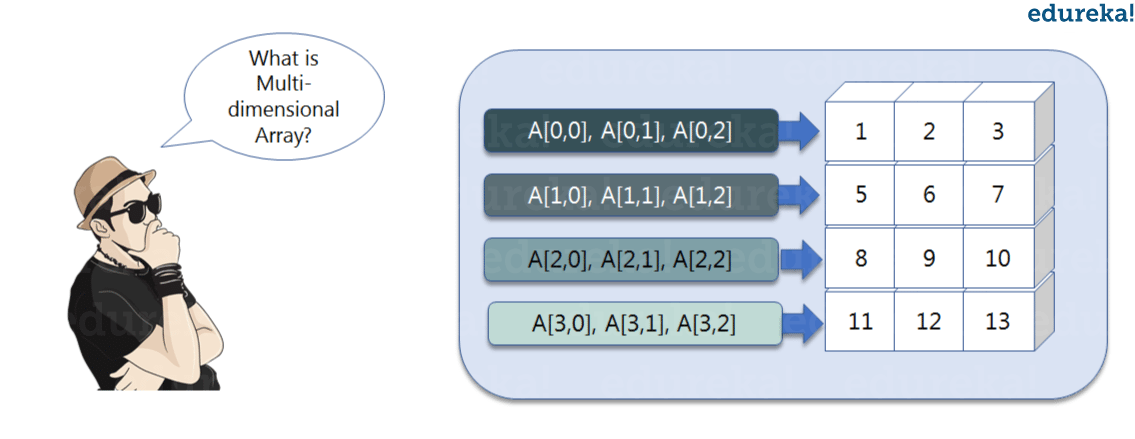
Multi-Dimension array ?
Multi-dimension array wo array hota hai jiske pass row aur coloum dono ho , jaise ki ap upar wale image mai dekh skte hai, agar hm 1 ki postion dekhe to 1 oth row aur oth coloum mai hai isi tarah agar 2 ki postion dekhe to 2 to wo 1st row aur 1st coloum mai hai. to ye ek multi - dimension array hai. Matrix ek 2-dimensional array hai.
Install Numpy
To install numpy use
pip install numpy
ap command prompt mai ja kr ise install kr skte hai. Install krne ke baad hame ise import krna padega tabhi hm iske functions ko use kr payenge.
To import numpy use this
NUMPY ARRAYNumpy array ko create krne ki 3 method hai
- Conversion from other python structure like list
- Using numpy functions
- By using special library function
1. Conversion from other python structure like listCreating the single dimension array--------------------------------------------Creating the single dimension numpy array from the listl =[3,6,32,7]myarr = np.array([l])myarroutput :array([ 3, 6, 32, 7])#ye basically ek single dimension array tha kyoki yaha sirf ek square bracket laga hai----------------------------------------------myarr[0]list =[0,1,2,3,4]ar = np.array(list)ararray([0, 1, 2, 3, 4])--------------------------------------------------------ar+2print(ar*4)mypr = np.array([[3,5,8,9]])myproutput:array([[3, 5, 8, 9]])#two dimension array mai two square bracket lagenge--------------------------------------------------------mypr[0,1]output:5# 5 ki position hai 0th row aur 1st coloum-----------------------------------------------------mypr.shapemypr[0,1]=45myprlistarray = np.array([[1,2,3] , [5,8,5],[0,3,1]])listarrayoutput:array([[1, 2, 3], [5, 8, 5], [0, 3, 1]])-------------------------------------------listarray.shapelistarray.size
- arange
jadatar ham arange ka use krte hai numpy array ko create krne mai
---------------------------------------------------
creating a one dimension array using arange
a = np.arange(20)
a
output:
array([ 0,  1,  2,  3,  4,  5,  6,  7,  8,  9, 10, 11, 12, 13, 14, 15, 16,
       17, 18, 19])
#passing the value 20 to the arange function create the array value ranging from 0 to 19
-------------------------------------------
Creating a two dimension array using arange
b = np.arange(20)
c=b.reshape(4,5)
c
array([[ 0,  1,  2,  3,  4],
       [ 5,  6,  7,  8,  9],
       [10, 11, 12, 13, 14],
       [15, 16, 17, 18, 19]])
#idhar hmne two dimension array banai hai , pahle one dimension array banaya fir usko reshape kr diya reshape keyword ka use krke , hamne ise reshape kiya 4 rows and five coloum mai#ap chahe to iska shape bhi dekh skte hai shape attribute ka use krke--------------------------------------c.shape(4, 5)#4 row and 5 coloum ---------------------------------------------------------------------------------------Creating the three dimension array using arange functiong=np.arange(27)h =g.reshape(3,3,3) h
array([[[ 0, 1, 2], [ 3, 4, 5], [ 6, 7, 8]], [[ 9, 10, 11], [12, 13, 14], [15, 16, 17]], [[18, 19, 20], [21, 22, 23], [24, 25, 26]]])----------------------------------------------------------------
- zeros
zeros = np.zeros((2,5))
zeros
output
array([[0., 0., 0., 0., 0.],
       [0., 0., 0., 0., 0.]])
# 2 row 5 coloum ka ek array ban gya jiske saare element zero hai
--------------------------------------------------------------
(2, 5)------------------------------------------------------------------
- Ones
np.ones((2,2))
array([[1., 1.],
       [1., 1.]])
# ye ek two dimensional numpy array jo ki bana hai ones function ka use kr ke
# Iske saare element one honge
----------------------------------------------------------------------
- Linspace
lspace = np.linspace(1,50,10)
lspace
array([ 1.        ,  6.44444444, 11.88888889, 17.33333333, 22.77777778,
       28.22222222, 33.66666667, 39.11111111, 44.55555556, 50.        ])
#linspace stand for linearly space ye krta kya hai dekhiye isne mujhe 1 se lekar 50 tak 10 linerely (equal space) space number de diye
-------------------------------------------------------------------------------
3.Using the special library function
hm special library function ka use kr skte hai array create krne ke liye
jaise ki random function, agar hame 0 se lekar 1 tak ke random number chahiye to hm random function ka use kr skte hai.
np.random.random((2,2))
outputarray([[0.24882453, 0.04518734], [0.75731583, 0.67272208]])--------------------------------------------------------------------------------Matrix in Numpy arrayMatrix basically ek 2-d array jaisa hai , to hm 2-d array ko matrix mai kyo convert kr rahe hai to answer hai ki matrix mai hm kai operation perform kr skte hai like addition , substraction, multipllication ,division, tranpose of matrix etc.---------------------------e =np.matrix([1,2,3,4])
eoutput:matrix([[1, 2, 3, 4]])f =np.matrix([4,5,6])foutput:matrix([[4, 5, 6]])--------------------------------------------------------print("Horizontal Append:" , np.hstack((e,f)))output:Horizontal Append: [[1 2 3 4 4 5 6]]# Yaha hamne horizontally append kiya hai append mtlb hota hai end mai jodna , to hmne horizontally 2 matrix ko jod diya hai hstack keyword ki help se.-----------------------------------------------------------------------------------Ab hm matrix ki baat kr rahe hai to matrix mai ek identity matrix hoti hai ,Identity matrix vo matrix hoti hai jiske diagonal ke element one hote haiy = np.identity(45)youtput:array([[1., 0., 0., ..., 0., 0., 0.], [0., 1., 0., ..., 0., 0., 0.], [0., 0., 1., ..., 0., 0., 0.], ..., [0., 0., 0., ..., 1., 0., 0.], [0., 0., 0., ..., 0., 1., 0.], [0., 0., 0., ..., 0., 0., 1.]])#ye 45 by 45 (45 rows and 45 coloums) ki ek identity matrix hai--------------------------------------------------------------------------------------Doubt?Ask me on comment section
Comments
Post a Comment